Motionleap by Lightricks
- 4.0
- Rating
- 50.00M
- Installs
- Free
- Price
 Analysis by App-foxy
Motionleap is the kind of photography app I open when a still image feels close to finished but lacks a little movement or atmosphere. It is made by Lightricks Ltd. and focuses on turning ordinary photos into animated visual pieces, with editing tools, effects, and an AI art generator included in the same creative workspace. I would not treat it as a replacement for a full desktop editor, but I do find it useful when I want a quick result that feels more alive than a standard filter can provide.
My first impression is that the app is aimed at people who enjoy experimenting rather than simply correcting exposure or cropping a picture. A landscape can gain moving clouds, water can appear more fluid, and a portrait can be given a stylized backdrop or atmospheric effect. The important distinction is that the movement is usually something I shape deliberately. It is not just a one-tap filter that changes the entire image and leaves me with little control.
That creative focus also explains why the app has become so widely used. Motionleap is free to install, carries an Everyone age rating, and has passed the fifty-million-install mark on Android. Its average rating is 4.0 from roughly 343 thousand ratings, which suggests a generally positive reception but also leaves room for a realistic interpretation: plenty of people enjoy it, while others likely find the paid boundaries, learning curve, or output expectations less comfortable.
You May Also Like

 Blood Strike: 2.5 Anniversary
Blood Strike’s Loadouts Turn Every Drop Into a Tactical Gamble
A close look at Blood Strike’s custom loadouts: how fast access to signature weapons reshapes its battle royale rhythm, rewards preparation, and narrows the gap between fights.

 Pandora - Music & Podcasts
Pandora’s Music Is Easy to Start, but Harder to Recover
Pandora’s strength is its low-effort path from a seed to a station. Its weak spot is how much confidence it asks you to place in connection, setup, and quiet recovery.

 8 Ball Pool
 Is Built on Rivalries, Rematches, and Routine
A close look at the rivalries, rematches, shared routines, and unanswered safety questions that turn a quick pool match into a persistent mobile community.

 Samsung Music
’s Quiet Strength Is Playing What You Already Own
Its reach comes less from spectacle than from dependable access to a personal library. That simplicity is both the app’s strongest retention engine and its ceiling.

 AccuWeather: Weather Radar
AccuWeather Review: A Quick, Clear Forecast for Everyday Decisions
For everyday plans, the best forecast is the one you can understand quickly. AccuWeather makes rain timing, radar, and local conditions easy to act on, with a few trade-offs.

 Hill Climb Racing
Why Hill Climb Racing Still Turns Crashes Into One More Run
A tiny car, a bumpy hill and one more upgrade: Hill Climb Racing keeps resurfacing because its simple chaos makes every near-miss feel personal.
More From Our News Desk
View All News


What Motionleap feels like in everyday use
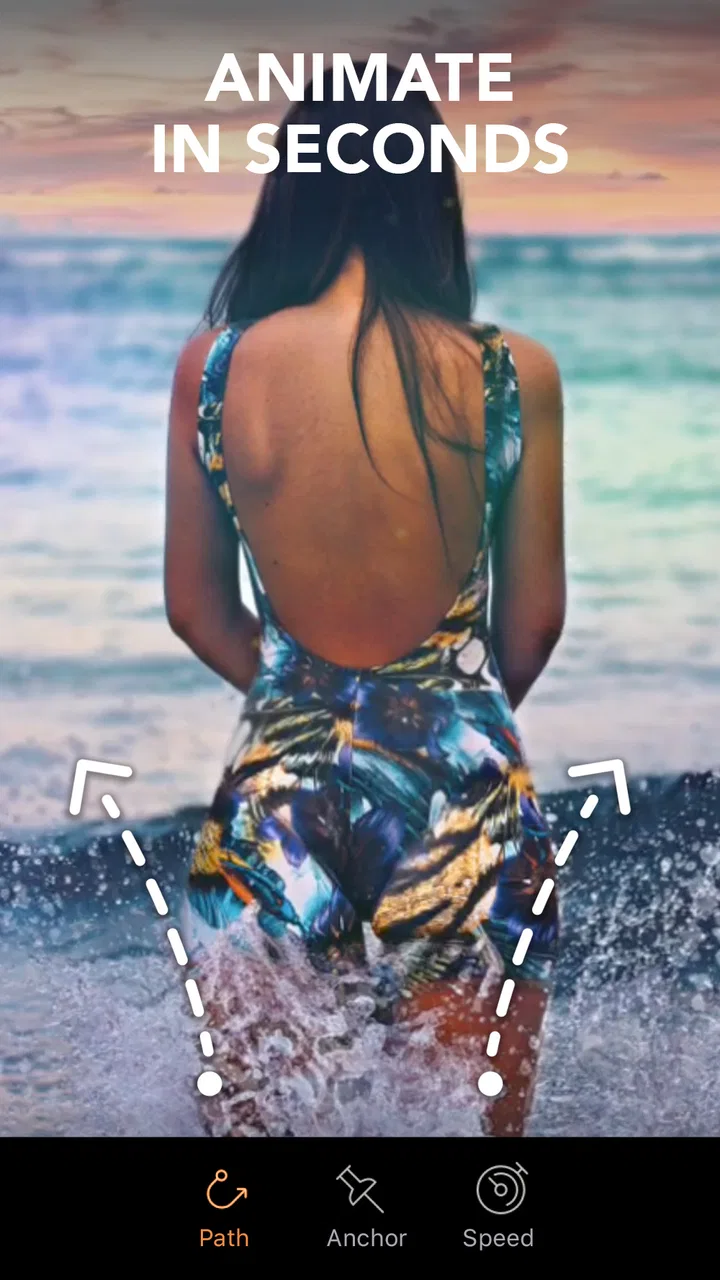
The basic workflow is easy to understand. I start with a photo, choose the part that should move, and use directional controls to guide that movement. I then protect areas that need to stay still, add visual effects where appropriate, and preview the result before exporting. That sequence sounds simple, but the quality of the final animation depends heavily on how carefully I mark edges and separate moving elements from fixed ones.
For example, imagine I have taken a sunset photo during a walk. Instead of applying a dramatic effect to the whole image, I can guide the clouds in one direction while leaving the buildings and horizon stable. If the mask around a roofline is careless, the roof may appear to bend or shimmer. Spending an extra minute refining that boundary often makes a bigger difference than adding another effect.
This is one of the app’s strongest qualities: it encourages me to think in layers of motion. I can ask which part of the image should move, which part should remain anchored, and where the eye should travel first. That makes it more interesting than a typical photo editor built mainly around brightness, contrast, saturation, and sharpening.
The interface is approachable for casual users, but Motionleap is not completely effortless. The first preview may look exciting while still revealing rough edges, especially around hair, tree branches, transparent objects, or busy backgrounds. I have found that restrained movement usually looks more convincing than aggressive animation. A subtle drift in clouds can feel natural; a strong directional push can quickly make the image look like a template.
Where the app is especially useful
I think Motionleap works best for social posts, short visual messages, mood boards, travel memories, and personal experiments. A still photo of coffee, rain on a window, a city street, or a beach can become a short looping visual without requiring me to learn traditional animation software. It is also handy for creating a striking background for a presentation or a simple visual invitation, provided I am comfortable checking the export carefully before sharing it.
Another practical use is reviving older photos. I can take an image that has emotional value but feels visually static, then add movement only to a small area. The result does not replace the original; it gives the memory a second presentation. I recommend keeping the original file untouched and treating the animated version as a separate interpretation, because heavy effects can easily become distracting when the source image matters personally.
The AI art generator adds a different kind of workflow. Instead of animating a photo I already own, I can use the app as a starting point for digital artwork. That is useful when I need an imaginative background, a concept image, or a visual direction before making a more polished composition elsewhere. I see this feature as a sketching tool rather than a guarantee of a finished design. Generated imagery may need cropping, cleanup, or additional editing if I want a consistent look across several pieces.
Three techniques that improve the result
The first technique is to plan the motion before touching the controls. I look for natural directional cues in the original image: the flow of water, the angle of clouds, a road leading into the distance, or the tilt of fabric. When the animation follows those cues, the result feels connected to the photograph. When it ignores them, the image can look artificial even if the technical mask is clean.
The second is to use protection controls more generously than I initially expect. It is tempting to mark only the obvious foreground subject, but small protected regions around boundaries can prevent unwanted warping. This matters particularly with faces, text, windows, poles, and straight architectural lines. I would rather have slightly less movement than allow important details to wobble.
The third is to preview at a slower, more critical pace instead of judging only the first loop. A movement that looks impressive for a moment may become repetitive or visibly reset when the animation cycles. I watch for sudden jumps at the loop point, unnatural acceleration, and areas that appear to stretch. If the effect is too obvious, reducing the range of movement often produces a more polished result than adding another layer.
How it compares with ordinary photo editors
Compared with a conventional mobile editor, Motionleap gives me a more focused way to create motion, but it is less suitable for detailed image correction. A standard editor is usually better when my priorities are accurate color, perspective fixes, selective retouching, or preparing a clean print. Motionleap is better when the question is, “What would happen if this part of the photo moved?”
It also differs from a full animation application. Dedicated animation tools can offer more precise timelines, keyframes, compositing, and control over multiple assets. That extra control is valuable for professional projects, but it also takes more time to learn. Motionleap occupies the middle ground: faster and more visually immediate than a traditional animation workflow, but not as exact or flexible as one.
I would choose a regular editor for a family photo that needs careful cleanup, a dedicated design tool for a branded campaign with strict consistency, and Motionleap for a quick animated concept or atmospheric social image. The right choice depends less on the quality of the app than on whether the task is correction, design, or motion.
Trust, controls, and moments that deserve care
Because the app can involve personal photos and AI-assisted creation, I pay attention to the choices presented during use rather than assuming that convenience tells me everything about data handling. My practical advice is to read permission prompts, review any account or sharing choices shown in the app, and avoid importing sensitive images unless I am comfortable with the controls available on my device and within the application.
I do not treat a free download as completely cost-free in the broader sense. Motionleap is free, but it includes in-app purchases ranging from under a dollar to nearly two hundred dollars per item. That is a wide range, so I would check the purchase screen carefully before confirming anything, especially if I am testing premium effects or using the app on a family device. A store price alone does not tell me which tools will be available in the particular workflow I want.
The app’s version shown for this review is 1.8.1, and it supports Android from version 7.1 onward. That makes it accessible to many older devices, although compatibility does not guarantee identical performance. Animation previews can be more demanding than ordinary photo adjustments, so I would keep expectations modest on an older phone and save work regularly if a project becomes complex.
Account controls and sharing decisions are worth handling deliberately. If the app presents an option to sign in, sync, share, or publish, I prefer to pause and decide whether that step is actually necessary for my goal. For a one-off animated image, I would rather keep the workflow local when the available choices allow it. For ongoing projects, I would review which account is being used and whether the sharing destination is correct before sending anything.
The most data-sensitive moments are usually not the obvious editing gestures. They are importing a private portrait, selecting an AI feature, granting access to the photo library, and tapping a sharing or export option without checking the destination. I make a habit of using a copy of an original photo, cropping out unrelated personal details, and checking the finished frame for names, addresses, screens, or documents that may have been visible in the source.
That caution does not make the app difficult to use; it simply keeps creative experimentation separate from information I would not want to distribute. For public-facing work, I also consider whether the image includes someone else’s face or recognizable property. Motionleap can make a casual photo more noticeable, so an image that seemed harmless in a private camera roll may deserve another look before being posted.
Who should use it and who should skip it
I would recommend Motionleap to someone who likes visual experimentation, wants animated photos without learning a complex timeline editor, or needs quick atmosphere for personal content. It is particularly appealing if the goal is to make one element move while preserving the identity of the original image. The AI art tools may also suit people who enjoy generating ideas and then refining them manually.
I would be more cautious about recommending it to someone who needs exact professional compositing, predictable brand assets, or advanced color-management controls. If every edge must remain mathematically precise, a desktop application or dedicated animation software will usually be a better fit. I would also suggest skipping it if the main need is simple photo correction; installing a motion-focused editor for cropping and brightness adjustments would add unnecessary complexity.
Parents and younger users should also remember the Everyone rating describes the app’s content classification, not a promise that every generated or imported image will be appropriate for every situation. I would still supervise purchases and sharing on a child’s device, particularly because creative tools can make it easy to publish something before considering who may see it.
My practical verdict
After using Motionleap as a photography tool rather than treating it as a magic effect button, I see a clear strength: it makes motion feel approachable. The best results come from small decisions—choosing a believable direction, protecting edges, previewing the loop, and resisting the temptation to animate everything. Those steps are simple, but they separate a convincing result from a distracting one.
Its limitations are equally clear. The app cannot replace a full editor when I need detailed retouching, and it cannot replace professional animation software when I need a precise timeline or complex compositing. The purchase range means I would inspect premium prompts carefully, and the presence of personal photos means I would treat permissions, account choices, AI use, and sharing as decisions rather than automatic steps.
Overall, I think Motionleap is worth trying for anyone who wants to turn still photography into short, expressive visual moments. I would start with a copy of a landscape or simple object, practice with restrained movement, and only then move on to portraits or more complicated scenes. With that approach, the app feels less like a collection of flashy effects and more like a compact creative studio for adding motion where a photograph needs it.
FAQs for Motionleap by Lightricks
01What is Motionleap by Lightricks used for?
Motionleap by Lightricks is a mobile photo-editing app designed to add movement and animated effects to still images. After testing its main tools, we found that users can animate selected areas, create flowing skies or water, add overlays, adjust camera effects, and apply visual filters. It is aimed at social media creators, photographers, and anyone who wants to turn ordinary photos into short, eye-catching animations.
02Is Motionleap free to download and use?
Motionleap can generally be downloaded for free on Android and iOS, but the free version provides access to only some tools, effects, and export options. Several advanced features may require a subscription or in-app purchase, depending on the current version and region. Before subscribing, check the pricing page carefully, including the billing period, trial conditions, and whether the subscription renews automatically.
03Is Motionleap suitable for beginners?
Yes, Motionleap is relatively approachable for beginners because its editing controls are presented through visual tools, gestures, and guided workflows rather than complicated professional timelines. The basic process involves selecting an area, placing motion arrows, and protecting parts that should remain still. However, achieving natural-looking results takes practice, especially when masking objects or controlling movement around detailed edges.
04Can Motionleap export animated photos or videos for social media?
Motionleap is designed to export animated creations in formats suitable for sharing, including short video-style results and, depending on the platform and current app version, other animated formats. Export settings may vary according to the device, account type, and selected features. Free exports can also include limitations such as watermarks or restricted quality, so review the export screen before saving.
05Does Motionleap require an internet connection?
An internet connection may be needed for downloading the app, accessing certain effects, processing cloud-based resources, restoring purchases, and receiving updates. Basic editing of already available content may work offline, but this can vary by device and app version. Users should also remember that high-resolution exports and asset downloads may consume considerable storage, mobile data, or battery power.
Pros
- Easy-to-use animation tools for beginners
- Works well for creating eye-catching social media posts
- Includes sky replacement and atmospheric effects
- Exports projects in multiple formats and resolutions
- Regular updates add new creative effects and tools
Cons
- Many advanced effects require a paid subscription
- Exported videos may include a watermark on the free plan
- Large projects can drain battery quickly
- Some effects need a stable internet connection to load
- Fine motion adjustments can feel imprecise on small screens

Motionleap by Lightricks
Gallery